
Tired of juggling spreadsheets, lost notes, and billing delays? Discover the ABA administrative tools that streamline compliance, reduce staff burnout, and improve your clinic’s operational health – without adding overhead. These tools typically include scheduling, billing, authorizations, credential tracking, and documentation systems designed specifically for ABA clinics.
Running an ABA clinic without the right admin tools is like navigating with a broken compass – every step requires effort, and mistakes are inevitable. The truth? Many clinics use outdated or generic systems, forcing staff to rely on memory, sticky notes, or chaotic spreadsheets.
But it doesn’t have to be this way. With the right ABA administrative tools, clinics can automate critical processes, stay audit-ready, and reduce burnout. Here’s how to equip your team with tools that actually make a difference – without creating more work.

ABA clinic administrative tools that matter most in 2026
- Compliance guardrails (EVV, supervision, payer rules)
- Scheduling + calendar conflict prevention
- Authorization and unit tracking
- Credential and license expiration alerts
- Billing + claims workflow tools
- Documentation and audit-ready note systems
- Staff availability + capacity management
What the Best ABA Administrative Tools Should Do
In ABA, administrative missteps don’t just slow you down – they lead to:
- Denied claims from expired credentials
- Overlapping or invalid sessions
- Missed authorizations or unit overages
- Documentation gaps that jeopardize payment
Most of these issues trace back to poor systems – not poor staff. That’s why investing in the right ABA clinic administrative tools pays off in time, money, and peace of mind.
Effective ABA management tools should do more than store data. They should:
- Enforce compliance logic automatically
- Make credential and documentation gaps visible in real time
- Integrate with billing and scheduling systems
- Scale as your team and client base grow
- Reduce reliance on admin memory or manual tracking
The best tools don’t create more buttons – they remove friction.
Core ABA Administrative Tools That Make an Immediate Impact
Here are the foundational tools every clinic should have baked into their ABA practice management software. These are the systems that prevent denials, reduce compliance risk and keep operations running smoothly.
1. Credential Tracking and Alerts
Track CPR, TB, DOJ, NPI, and licensure renewals by staff role. Get proactive notifications before anything expires – and prevent scheduling when non-compliant.
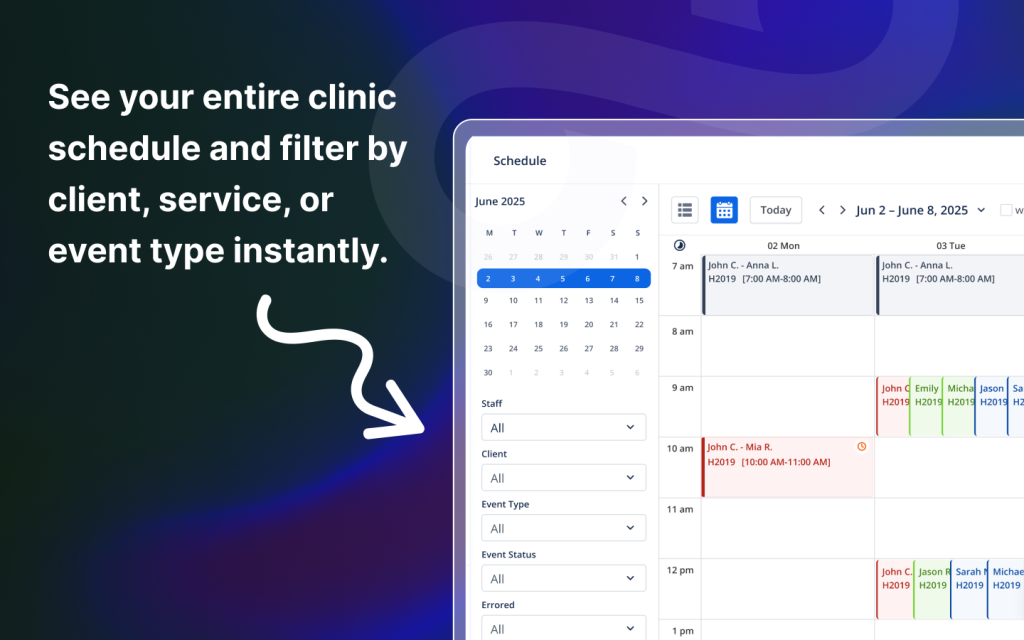
2. Scheduling Automation + Conflict Prevention
Scheduling is one of the biggest sources of compliance risk. The right ABA scheduling tools prevent overlapping sessions, enforce staff qualifications, and reduce cancellations and makeups chaos — without requiring admins to manually double-check every calendar.
3. Authorization and Unit Tracking
Missed authorizations and unit overages are silent revenue killers. Strong ABA authorization management tools track units in real time, warn teams before overages happen, and flag sessions that should not be delivered without valid coverage.
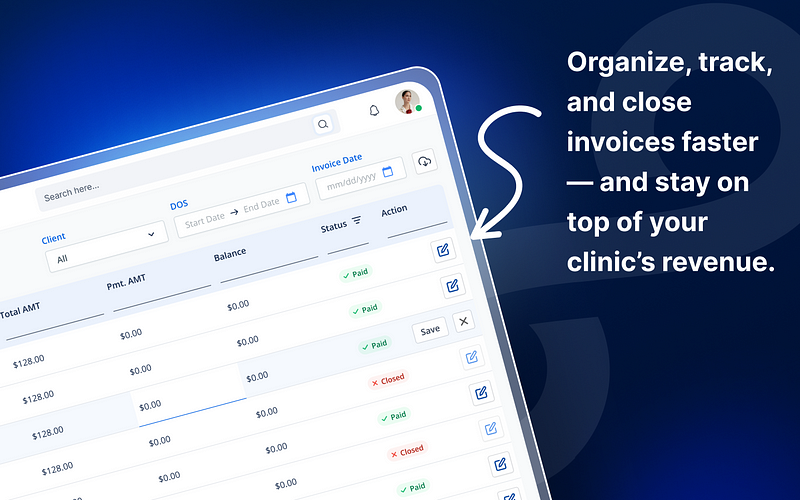
4. Billing + Claims Workflow Tools
Billing doesn’t fail because staff don’t care – it fails because systems don’t catch problems early. Built-in billing tools help clinics reduce denials, catch missing information before submission, and streamline claims workflows across payers.
5. Document Management
Upload and tag files to staff, clients, and sessions. Store payer documents, credential proofs, treatment plans, and clinical notes with HIPAA-grade encryption — without hunting through email chains or shared drives.
6. Audit-Ready Session Logs
Time-stamped notes, service codes, and signatures attached to each appointment. The best platforms verify documentation completeness before billing so claims don’t go out missing critical details.
7. Documentation Completion Rules (Before Billing)
Audit readiness isn’t just “having notes.” It’s having the right note, completed on time, with the right codes. Documentation management tools should automatically flag incomplete notes and prevent billing when documentation is missing.
8. Role-Based User Access
Limit staff access to what they need – ensuring compliance while protecting sensitive data. Customize access for RBTs, BCBAs, admins, and billers to reduce risk and protect client privacy.
9. Staff Availability + Capacity Planning
Many clinics don’t struggle with demand – they struggle with matching staff availability to client needs. Staff scheduling tools help clinics plan capacity, manage workloads, and reduce burnout by preventing unrealistic schedules.
10. Integrated Admin Dashboards
Real-time visibility into credential expirations, authorization status, incomplete sessions, billing holds, and documentation gaps – all in one place. Dashboards give clinic owners and admins a live operational view instead of reactive problem-solving.
These are not extras. These are the new baselines for efficient ABA practice management.
Why Spreadsheets and “Workarounds” Don’t Work
We get it – spreadsheets feel free. But they often cost more in:
- Missed alerts
- Overlooked deadlines
- Staff errors
- Claim denials
In 2025, relying on disconnected admin tools is a recipe for rework. With built-in ABA administrative tools, your system does the checking before errors happen – not after.
Case Study: Replacing 6 Admin Tools with One
A two-location clinic with 25 staff used separate tools for credential tracking, scheduling, billing, notes, and document storage.
The result?
- Overlapping data entries across five platforms
- Staff confusion over where to update credentials
- Lost payer documents and denied claims
After migrating to an integrated ABA software platform:
- Time spent on credential updates dropped by 75%
- Billing lag decreased from 10 days to 3
- All required documentation became centralized and audit-ready
They replaced stress with structure – without adding new admin hires.
How to Choose the Right Administrative Platform
Ask these questions when evaluating ABA clinic administrative tools:
- Can we track credentials and alert staff automatically?
- Are documents stored and linked to sessions, clients, and staff?
- Do we get real-time compliance visibility?
- Can admins customize workflows without IT help?
- Does it reduce manual entry across teams?
If the answer isn’t a confident “yes,” the system might be costing you more than you realize.
Conclusion
In ABA, administration isn’t just paperwork – it’s the engine that keeps billing flowing, care consistent, and staff accountable.
The right ABA administrative tools don’t add work. They remove the manual steps, guesswork, and stress that drain your team. If your current systems don’t help your clinic stay compliant and efficient automatically, it’s time for a change.
FAQs
1. What are ABA administrative tools?
ABA administrative tools are the systems clinics use to manage scheduling, billing, authorizations, credential tracking, and documentation. The best tools reduce denials, improve compliance, and keep clinics audit-ready.
2. What admin tasks can ABA software automate?
Credential alerts, documentation checks, note completion tracking, and audit prep – just to name a few.
3. Are all-in-one platforms better than individual tools?
Yes. Integrated platforms reduce errors, duplication, and staff confusion by centralizing data.
4. Can small clinics benefit from administrative tools?
Absolutely. In fact, small clinics often see the fastest ROI by reducing manual admin work.
5. What happens if you skip these tools?
Higher denial rates, compliance issues, and wasted staff time on preventable rework.